The Goal
Many footstep effects in games are cosmetic, a decal, a particle puff, maybe a footprint-shaped texture blended onto the ground. My goal was to try a different approach: real geometric depressions in the terrain itself, generated and faded in real time, driven entirely by GPU-side texture sampling rather than CPU mesh editing. No vertex buffers get rewritten on the CPU and no physics collision changes, purely visual technique that displaces what the camera sees.
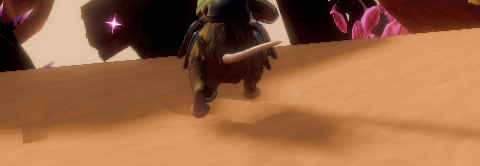
The core idea is: store “how deformed is the ground at this point” in a small texture, update that texture with a few cheap draw calls whenever a foot plants or time passes, and have the terrain’s own vertex shader read that texture to push its geometry down. Three pieces make this work: the deformation texture itself, the logic that draws into it, and the terrain shader that reads from it.
The Deformation Texture
A single-channel, fixed-resolution render target represents the deformable area. This is not tied to screen resolution, it’s a world-space-fixed texture, sized once and never resized as the camera moves or the window changes.
// Component::Terrain (ECS component)
RenderTarget footstepDeformationRT;          // 512x512, R8_UNORM
int footstepChunkIndex{ -1 };                // which chunk supports footprints
Vector3f footstepChunkMinLocal{ 0.f, 0.f, 0.f };
float footstepChunkWidth{ 0.f };
float footstepChunkLength{ 0.f };
A value of 0 in this texture means “undisturbed sand.” A value approaching 1 means “fully deformed.” The texture maps onto one rectangular patch of terrain via a simple linear transform: footstepChunkMinLocal is the patch’s corner in the terrain’s local space, and footstepChunkWidth/footstepChunkLength give its size. Any world position within that patch converts to a 0–1 UV coordinate with a single subtraction and division:
uv.x = (localPos.x - footstepChunkMinLocal.x) / footstepChunkWidth;
uv.y = (localPos.z - footstepChunkMinLocal.z) / footstepChunkLength;
That’s the entire interface between gameplay code and the rendering system: a 2D position in, a 0–1 UV out.
Drawing Into the Texture
Two operations write into the deformation texture, and both work the same way, bind the texture as a render target, draw a procedural quad with no actual vertex buffer (the four corners are computed in the vertex shader directly from SV_VertexID), and let a pixel shader decide what value to write. Stamping, triggered once per footstep, writes a soft circular falloff centered on the planted foot’s UV position:
void DrawStamp(Component::Terrain& aTerrain, Vector2f aCenterUV, Vector2f aRadiusUV, float aDepth)
{
    auto& stateStack = Engine::GetGraphicsEngine().GetGraphicsStateStack();
    stateStack.Push();
    stateStack.SetBlendState(BlendState::Max); // new stamps never erase deeper existing ones

    stateStack.SetCustomShaderParameters({ aCenterUV.x, aCenterUV.y, aRadiusUV.x, aRadiusUV.y });
    stateStack.SetAdditionalCustomShaderParameters({ aDepth, 0.f, 0.f });

    aTerrain.footstepDeformationRT.SetAsActiveTarget();
    stampShader->PrepareRender();

    DX11::Context->IASetPrimitiveTopology(D3D11_PRIMITIVE_TOPOLOGY_TRIANGLESTRIP);
    DX11::Context->Draw(4, 0); // 4 vertices, no vertex buffer needed
    DX11::Context->IASetPrimitiveTopology(D3D11_PRIMITIVE_TOPOLOGY_TRIANGLELIST); // restore default

    stateStack.Pop();
}
The pixel shader for this pass is a soft radial falloff: distance from the stamp center determines opacity, with smoothstep providing a gentle edge rather than a hard circle:
float4 main(StampVSOutput input) : SV_TARGET
{
    float dist = length(input.uv - StampCenterUV) / length(StampRadiusUV);
    float falloff = 1.0 - smoothstep(0.6, 1.0, dist);
    return float4(falloff * StampDepth, 0, 0, 1);
}
BlendState::Max means overlapping stamps take whichever is deeper, so footsteps don’t erase each other or get erased by shallower, more recent ones. Fading runs once per frame, unconditionally, multiplying every pixel in the texture by a decay constant:
void RunFadePass(Component::Terrain& aTerrain)
{
    constexpr float FADE_DECAY = 0.99917f; // ~95% faded after 60 seconds at 60fps

    auto& stateStack = Engine::GetGraphicsEngine().GetGraphicsStateStack();
    stateStack.Push();
    stateStack.SetBlendState(BlendState::Multiply); // existingValue * newValue

    stateStack.SetAdditionalCustomShaderParameters({ 0.f, FADE_DECAY, 0.f });
    aTerrain.footstepDeformationRT.SetAsActiveTarget();
    fadeShader->PrepareRender();

    DX11::Context->IASetPrimitiveTopology(D3D11_PRIMITIVE_TOPOLOGY_TRIANGLESTRIP);
    DX11::Context->Draw(4, 0); // full-coverage quad this time
    DX11::Context->IASetPrimitiveTopology(D3D11_PRIMITIVE_TOPOLOGY_TRIANGLELIST);

    stateStack.Pop();
}
The trick here is BlendState::Multiply. A naive fade would need to read the current value, multiply it by the decay constant, and write it back, but a texture can’t be bound as both a shader input and a render target at the same time. Setting up a blend mode where the output gets multiplied into whatever’s already in the render target sidesteps that entirely: the pixel shader just outputs a flat FADE_DECAY value at every pixel, and the GPU’s blend hardware computes existing * FADE_DECAY automatically, with no texture read required. This fade pass should run only while gameplay is actually advancing, not while the game is paused. Hooking it into the main per-frame gameplay tick, rather than directly into the render loop, keeps it naturally tied to the same pause state as everything else:
myScene->ForEach<Component::Terrain>([](Component::Terrain& aTerrain)
{
    if (aTerrain.footstepChunkIndex >= 0)
    {
        FootstepDeformation::RunFadePass(aTerrain);
    }
});
Reading the Texture in the Terrain Shader
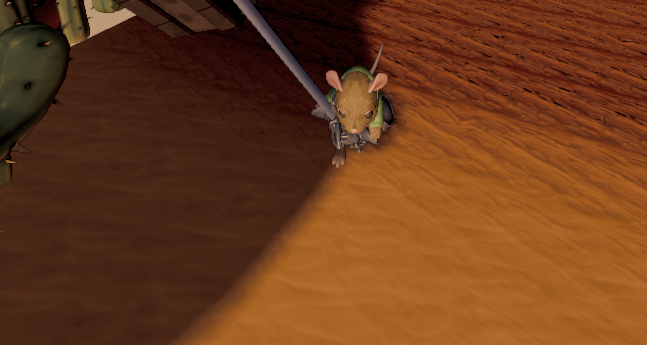
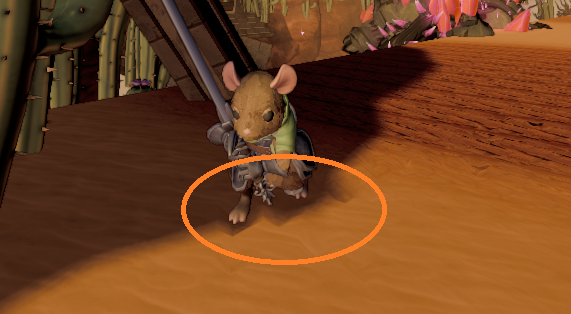
This is where the actual depression appears. The terrain’s vertex shader samples the deformation texture at each vertex’s world position and pushes that vertex down before any camera transform is applied:
Texture2D FootstepDeformationRT : register(t0);

ModelVertexToPixel main(ModelVertexInput input)
{
    ModelVertexToPixel result;

    float4 worldPos = mul(ObjectToWorld, input.position);

    // World XZ -> deformation texture UV, using the same transform
    // as the gameplay-side UV calculation shown above.
    float2 chunkMinLocal = CustomShaderParameters.xy;
    float2 chunkSize = CustomShaderParameters.zw;
    float2 footstepUV = (worldPos.xz - chunkMinLocal) / chunkSize;

    float deformation = FootstepDeformationRT.SampleLevel(defaultSampler, footstepUV, 0).r;
    float maxDepthCm = AdditionalCustomShaderParameters.x;
    worldPos.y -= deformation * maxDepthCm;

    float4 viewPos = mul(CameraView, worldPos);
    result.position = mul(CameraProj, viewPos);
    result.worldPosition = worldPos;
    // ...remaining outputs (UV, vertex color, normal data) unchanged
    return result;
}
 ,
, 
SampleLevel is used instead of Sample because vertex shaders can’t compute the screen-space derivatives that automatic mip selection needs, the mip level has to be specified explicitly (level 0, the full-resolution texture, since this particular texture has no mip chain to begin with). Because the deformation texture only covers one designated rectangular patch, this modified shader is only used for the terrain chunks inside that patch. Every other chunk in the level keeps using the unmodified terrain shader, matched per-chunk at render time:
for (const auto& [model, mesh, obToWorld] : terrain.chunks)
{
    const bool isFootstepChunk = /* this chunk's model matches the configured footstep chunk */;

    if (isFootstepChunk)
    {
        stateStack.SetCustomShaderParameters({ chunkMinLocal.x, chunkMinLocal.z, chunkWidth, chunkLength });
        stateStack.SetAdditionalCustomShaderParameters({ maxDepthCm, 0.f, 0.f });
        StateCache::SetVSSRV(0, deformationRT.GetShaderResourceView());

        footstepTerrainShader.Render(mesh, obToWorld);
    }
    else
    {
        terrainShader.Render(mesh, obToWorld);
    }
}
This per-chunk shader swap has to happen consistently everywhere the terrain is drawn, not just in the main color pass, but in any earlier depth-only pre-pass too, using the same displacement and the same parameters. A renderer that draws depth and color in separate passes needs both to agree on where the geometry actually is; if one pass displaces a vertex and another doesn’t, the two will disagree about depth at exactly the pixels where the displacement happens, which shows up as a hard visual seam right where the deformation is, a reminder that “render geometry” in a modern deferred renderer usually means several coordinated passes, not one.
Why a Vertex Shader, Not a Tessellation Stage
Here, one might want to subdivide the terrain into many small triangles near the player and displace each one, producing a smooth, high-detail dent. That’s a legitimate approach, and it’s the more general solution if fine control over deformation resolution, independent of the underlying mesh, is needed. It adds complexity: a hull shader to decide tessellation density, a domain shader to actually apply the displacement, and careful handling of how the newly-generated, finer geometry integrates with whatever depth, shadow, and lighting passes the renderer already has for the original mesh. If a renderer doesn’t already have those integration points in place for tessellated geometry, building them from scratch is a big undertaking on its own, separate from the deformation effect itself. Driving displacement directly from the terrain’s own existing vertex shader sidesteps all of that. It reuses every render pass the terrain already participates in, shadows, depth, lighting, without modification, at the cost of a real constraint: the resolution of the deformation is capped by how dense the terrain mesh already is. A footstep can only displace as finely as the nearest existing vertices allow. For a terrain mesh with a vertex roughly every meter, an individual footprint looks more like a shallow, blocky dimple than a precisely foot-shaped indentation, visible and convincing from a normal play distance, but not a perfect silhouette of a boot sole up close.If finer detail is needed later, the natural next step is building a denser mesh specifically for the footstep-enabled patch, more vertices in that one area, sampled from the same underlying heightmap at a finer interval, while leaving the rest of the terrain, and the simple vertex-shader-driven displacement technique, untouched.
Summary
The whole system is three independent, swappable pieces: a small texture holding deformation state, two GPU draw calls that update it (stamp on footstep, fade every frame), and one shader modification that reads it back into real terrain geometry. None of the three pieces need to know about the others’ internals, they only share a texture and a coordinate transform. That separation is what makes the system easy to reason about: the gameplay code that decides when a foot plants never touches a shader, and the shader that displaces terrain never has to know what a footstep even is.